Introduction
And here we are, in the second part of the JS Pattern brush series!
In the last post, we learned how to draw and interact with a Bézier curve, as well as to draw progress points within it.
In this post, we will learn how to find the tangent and normal directions of the curve at any given time.
Table of contents
Tangent
The tangent of our curve is its derivative, so both terms can be used to describe the same thing. The derivative of a curve is its slope at a given time.
Using De Casteljau
If you remember the De Casteljau’s algorithm’s from last post,
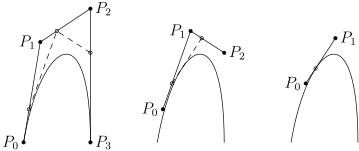
The curve slope at a time T is the same as the last curve slope.
Here is a nice visualization from Freya’s playground:

In this image, the slope between points d and e is the Tangent of the curve on time T.
This algorithm is strongly based off Linear Interpolation, or Lerping:
const a = lerp(p0, p1, t);
const b = lerp(p1, p2, t);
const c = lerp(p2, p3, t);
const d = lerp(a, b, t);
const e = lerp(b, c, t);
Using those newly found points, you can easily find the slope between point e and point d.
Using the derivative
While this method is easy to understand, you can optimize this algorithm by finding the derivative of the original algorithm.
The derivative formula, according to Wikipedia, is the following:
The derivative for a curve of order n is

Converting the algorithm to JavaScript, and simplifying it, we end up with:
-3(1-t)**2 * P0 +
3(1-t)**2 * P1 - 6t(1-t) * P1 +
- 3t**2 * P2 + 6t(1-t) * P2 +
3t**2 * P3
(Where ** means power of)
Implementation
With this knowledge, let’s improve our Bezier class!
As you may have noticed from the formula, there are many arithmetic operations performed on our points, therefore we can start by adding these to our Vector class:
export class Vector {
  constructor(x, y) {
    this.x = x;
    this.y = y;
  }

  multiply(scalar) {
    return new Vector(this.x * scalar, this.y * scalar);
  }

  divide(scalar) {
    return new Vector(this.x / scalar, this.y / scalar);
  }

  add(otherVector) {
    return new Vector(this.x + otherVector.x, this.y + otherVector.y);
  }

  subtract(otherVector) {
    return new Vector(this.x - otherVector.x, this.y - otherVector.y);
  }
}
Then, we can implement the derivative, inside our Bezier class:
  derivative(time) {
    // -3(1-t)^2 * P0 +
    // 3(1-t)^2 * P1 - 6t(1-t) * P1 +
    // - 3t^2 * P2 + 6t(1-t) * P2 +
    // 3t^2 * P3

    const timePow2 = time ** 2;
    const oppTime = 1 - time;
    const oppTimePow2 = oppTime ** 2;

    const p0Result = this.p0.multiply(-3 * oppTimePow2);
    const p1Result = this.p1.multiply(3 * oppTimePow2)
      .subtract(this.p1.multiply(6 * time * oppTime));
    const p2Result = this.p2.multiply(-3 * timePow2)
      .add(this.p2.multiply(6 * time * oppTime));
    const p3Result = this.p3.multiply(3 * timePow2);

    return p0Result.add(p1Result)
        .add(p2Result)
        .add(p3Result);
  }
As you noticed, I extracted the common variables into their own constants, and separated the equation into four variable, one per point.
The sum of these four vectors is the derivative, and therefore tangent, of the curve!
Visualization
Now that we have the tangent, we want to see it in the curve.
First, let’s create a derivative.js file in the visuals folder.
It will be similar to progress_points.js, but draw various lines for the derivatives at various times.
We can start off by making the style constants:
const PROGRESS_POINT_COUNT = 10;
const PROGRESS_POINT_DISTANCE = 1 / PROGRESS_POINT_COUNT;
const LINE_LENGTH = 20;

const svgns = "http://www.w3.org/2000/svg";
const model = document.createElementNS(svgns, "line");
model.setAttribute("stroke", "#f00");
model.setAttribute("stroke-width", "1");
Then, create the easy method to clear a group:
export const removeDerivatives = (svgGroup) => {
  while (svgGroup.children.length) {
    svgGroup.removeChild(svgGroup.children[0]);
  }
};
And finally, implement the drawing logic itself:
export const drawDerivatives = (curve, svgGroup) => {
  removeDerivatives(svgGroup);

  for (let i = 0; i <= PROGRESS_POINT_COUNT; i++) {
    const instance = model.cloneNode();
    const t = i * PROGRESS_POINT_DISTANCE;

    const position = curve.point(t);
    const derivative = curve.derivative(t);
    const positionEnd = position.add(derivative.multiply(LINE_LENGTH));

    instance.setAttribute("x1", position.x);
    instance.setAttribute("x2", positionEnd.x);
    instance.setAttribute("y1", position.y);
    instance.setAttribute("y2", positionEnd.y);

    svgGroup.appendChild(instance);
  }
};
Then, all we need to do is create the group, which will contain those lines, and call the newly created methods!
Inside index.html, we add a new group next to the progress points:
<!-- Progress points -->
<g id="progress"></g>
<g id="derivatives"></g>
Inside control.js, we add a reference towards this group:
const [progressGroup] = $("#progress");
const [derivativeGroup] = $("#derivatives");
And finally, still inside control.js, we call the drawing method:
// Draw visual elements
drawProgress(curve, progressGroup);
drawDerivatives(curve, derivativeGroup);
Let’s see how this looks:

Technically, we have the derivatives!
Practically, the size of these is way too big for our visualisation.
Let’s normalize our derivative before drawing it.
To normalize it, let’s head back to our bezier.js file, into our Vector class, and add the following method:
  normalize() {
    const scale = Math.sqrt(this.x ** 2 + this.y ** 2);
    return this.divide(scale);
  }
This will make the length of our vector 1, which is a lot more stable and manageable than a dynamic length vector.
We can then add this new method in the end of our derivative vector sum:
return p0Result.add(p1Result).add(p2Result).add(p3Result).normalize();And see the result!

A lot better, isn’t it?
As you can notice, the tangent is straight on the curve for the straightest segments, while it diverges noticeably on the corners.
This is the expected result, and means that our tangent is correct!
Normal
Finding the normal will be a lot easier.
While the tangent is always the slope of the curve, the normal is perpendicular from the slope at a given time.
As the difference between a perpendicular and a parallel line is 90 degrees, we can rotate our tangent by 90 degrees to find our normal!
Let’s implement this in our Bezier class:
normal(time){
  const derivative = this.derivative(time);
  return new Vector(derivative.y, -derivative.x);
}
In here, I used a simple trick to rotate the vector 90 degrees:
- Swap the X and Y values
- Multiply one of them by
-1
In this case, I’m rotating by 90 degrees counter-clockwise so it goes upward on a left-to-right curve, but we might need to swap this in the future.
Note that I didn’t normalize the vector: As I’m using this.derivative as source, it already is normalized.
Visualizing the normal can be done in the exact same way as for the tangent, therefore it will be left as an exercise for the reader!

Conclusion
We gained a better understanding of Bézier once again, and now can find the normal and tangent lines at any given time on a curve!
In the next post, we will make the first working version of our pattern brush using WarpJS!
As always, the resulting code is available on GitLab!